Numeric Width/Height Values Sometimes Published Without Units
Issue:
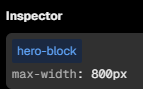
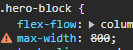
In certain situations, setting a numeric value for width or height in the Style Panel results in the value being saved and published without a unit, causing invalid CSS like:
This breaks layout rendering and can go unnoticed until inspecting the published styles.
✅ How to Reproduce (Most Reliable Case)
Set
widthorheighttoautoin the Style PanelThen change it to a numeric value (e.g.
800)Don’t press
Enteror typepxmanuallyPublish immediately without refreshing the page
Resulting CSS:
width: 800;
Note: The bug can also occur in other scenarios — this is just the most consistent way to reproduce it.
🤔 Expected Behavior
Any numeric input for width/height should default to px unless another unit is explicitly set — and this should persist in the published output, regardless of prior state or interaction.
🚨 Actual Behavior
In certain cases (e.g. after setting auto), Clutch accepts and publishes a numeric value with no unit. This can happen:
Without a page refresh
If the user doesn’t press
Enteror reselect a unitEven though
pxis shown as selected in the UI
🛠 Workarounds
Manually type
800pxOr press
Enterafter entering the numberOr refresh the page before publishing
⚠️ Impact
High UX risk — silently causes invalid styles in production builds, confusing both designers and developers.
✅ Suggested Fix
Always coerce numeric values to include the selected or default unit before save
Validate units before publishing
Ensure unit defaults are applied reliably, regardless of previous style states (like
auto)
Please authenticate to join the conversation.
Under Review
Bug
High Priority
Over 1 year ago

alexprieu
Subscribe to post
Get notified by email when there are changes.
Under Review
Bug
High Priority
Over 1 year ago
alexprieu
Subscribe to post
Get notified by email when there are changes.