Embed Components Append Semicolon After </iframe> on Save
Issue:
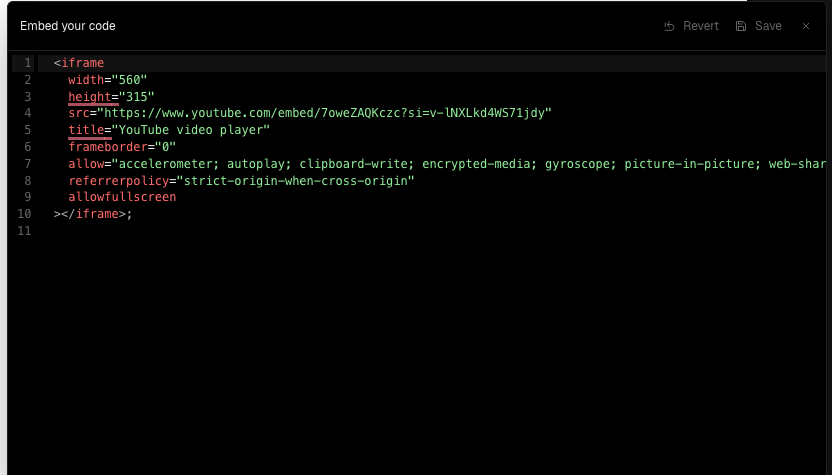
When saving an Embed component that contains an <iframe>, a stray semicolon (;) is appended after the closing </iframe> tag. This character renders visually on the site.
However, the bug only occurs when the embed contains no HTML comments. Adding a comment — either before or after the iframe — prevents the issue.
Example (broken):
<iframe src="..." width="600" height="400"></iframe>Published Output:
<iframe src="..." width="600" height="400"></iframe>;Example (working):
<!-- some comment -->
<iframe src="..." width="600" height="400"></iframe>
or
 <iframe src="..." width="600" height="400"></iframe>
<!-- some comment -->
Expected Behavior:
The embed should not append any additional characters unless explicitly added by the user.
Actual Behavior:
A semicolon is injected after the closing tag — but only when there are no comments in the markup.
Steps to Reproduce:
Add an Embed component with only an
<iframe>Save and publish
Observe semicolon appearing after the iframe
Workarounds:
Add a dummy comment anywhere in the embed content (before or after the iframe)
Impact:
Medium – breaks visual polish and introduces confusing behavior for users embedding external content.
Notes:
This may be due to a parser quirk or a serialization artifact that gets bypassed when the content includes an HTML comment.
Suggested Fix:
Sanitize embed output on save to strip unintended trailing characters. Investigate parser behavior for content without comments.
Please authenticate to join the conversation.
Under Review
Bug
Medium Priority
Over 1 year ago

Alex Prieu
Subscribe to post
Get notified by email when there are changes.
Under Review
Bug
Medium Priority
Over 1 year ago
Alex Prieu
Subscribe to post
Get notified by email when there are changes.